Introduction: To Hell With Being a Parrot
My name is Dmitry Doroshenko. I am the founder of the SiWItPro agency and a senior SEO specialist. For the last fifteen years, all I’ve done is explain to people how to write articles.  To content managers, executives, copywriters, and editors. And every time, it’s the exact same thing. The same edits, the same mistakes. At some point, I realized: enough playing the parrot.
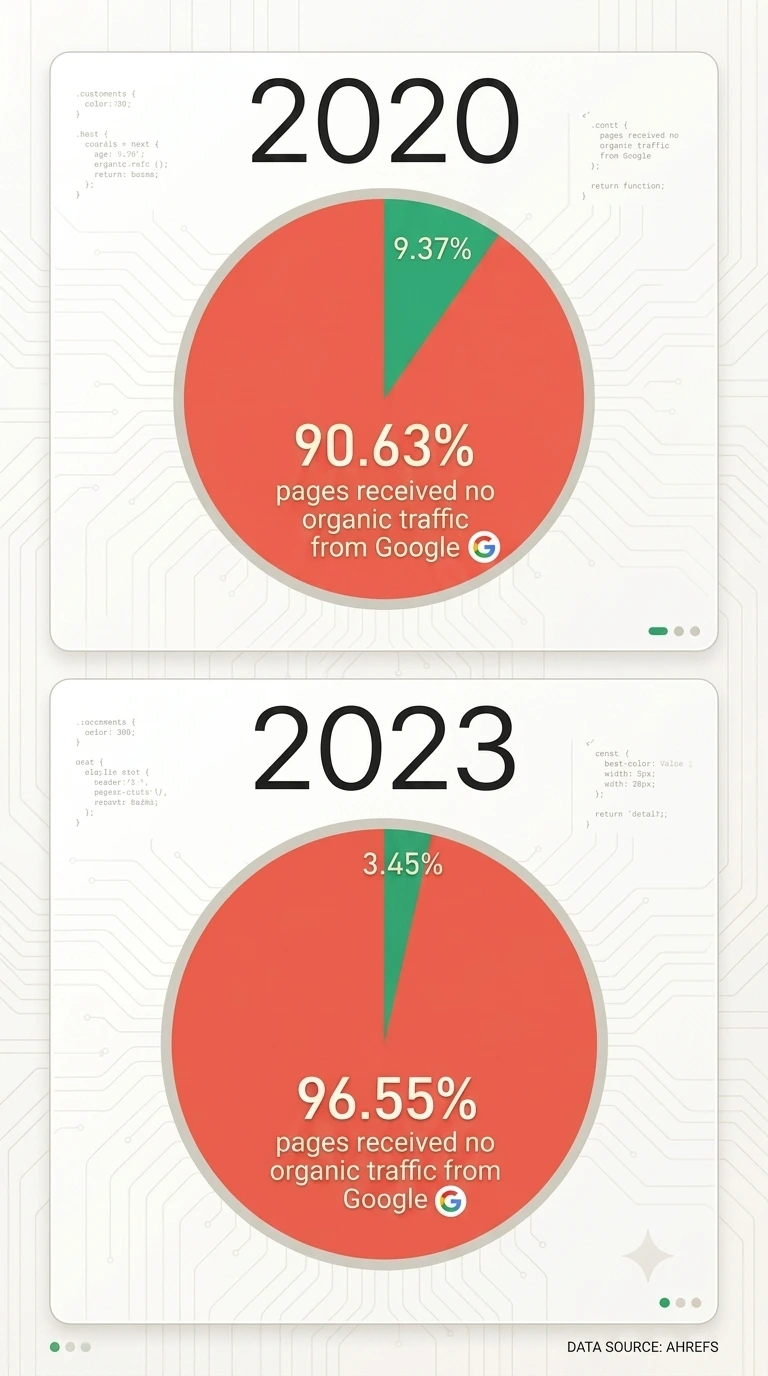
According to a 2020 Ahrefs study based on the analysis of over 1 billion pages from their Content Explorer database, approximately 90.63% of pages get zero organic traffic from Google. In their updated 2023 study with a sample size of around 14 billion pages, this metric grew to 96.55%. Why? Because they are written based on "gut feeling" or outdated templates.
I have compiled all the requirements, standards, and life hacks into a single article. This is my public technical brief. Not abstract "write high-quality text," but a concrete skeleton that you just need to dress up with a topic and keywords. You no longer need to ask me "how many subheadings?", "can we post an image without an alt tag?", or "can we write this with AI?". You simply send the copywriter the link, the topic, and the semantics — and that's it.
This article is for:
- Executives — to stop buying a pig in a poke.
- Content managers — to get a ready-made brief and an acceptance checklist.
- Copywriters — to understand what Google actually wants today, instead of guessing.
If you think this will be "10 tips on avoiding fluff and keeping it unique" — relax. This is going to be a technical map. A table. Rules. HTML snippets. And absolutely no parrots.
Block 0: What You Give the Copywriter Before They Start
The ideal article doesn't start with text. It starts with a brief. If a copywriter only gets a "topic and keywords," the output will be a text going nowhere. Here is what must be in the brief besides the topic:
- Search Intent. One word that changes everything. Informational — the user wants to know (guides, what it is, how it works). Commercial — wants to choose/compare (tops, ratings, vs reviews). Transactional — wants to buy (product cards, where to order). If the intent is guessed wrong, the article won't take off regardless of your optimization.
- Top 3 Competitors. Three URLs that are already ranking for the target keyword. The copywriter's job is not to rewrite, but to outperform: find questions the competitors didn't answer, provide more examples, and make it more visual.
- Semantic Core and NLP Entities. The main keyword + LSI terms (synonyms, related concepts, People Also Ask terms). Google's algorithms work based on Natural Language Processing (NLP). You must use "entities" — specific names, brands, locations, and terms related to the topic. This helps the search engine understand the depth of topic coverage without mindlessly repeating the same words.
- Unique Angle (Information Gain). What do you know that competitors don't? A case study, internal statistics, a failure, an insight. If you don't have this, your article will join those 96.55% of invisible pages.
Technical Part: The Complete Article Skeleton
Next up is every element that is mandatory in an article. Nothing is left to "the author's discretion."
1. Title (Meta Title)
- Length: 50–65 characters with spaces (or up to 580 pixels). Mobile search cuts off anything longer.
- Formula: [Main keyword] + [USP/trigger] + [Year/Number].
- According to a Backlinko study (analyzing millions of search results), Titles containing a question have a 14% higher CTR (click-through rate) than those without. Use questions where they fit organically.
- Forbidden: Two identical Titles on different pages of the site (cannibalization).
2. Description (Meta Description)
- Length: 120–155 characters (up to 920 pixels). If it's less, no big deal. If more, it will be truncated.
- Goal: Sell the click, not list keywords.
- Mandatory: An action verb, a benefit, audience clarification.
- Example: "Checklist, structure table, and acceptance rules. Give the copywriter the link — and get articles that immediately hit the Top."
3. URL (Slug)
- Structure: site.com/blog/transliterated-keywords
- Only Latin characters, no stop words (not, and, or), no numbers, and no special characters.
- Human-readable. The URL should make it clear what the page is about before the click. Studies confirm that short URLs have a slight ranking advantage over long ones.
4. H1 Heading
- One per page. Includes the main keyword.
- Can be longer than the Title, more descriptive. Should not duplicate the Title word-for-word, but should heavily overlap in meaning.
5. Table of Contents
- Mandatory above the fold, before the first H2.
- Contains anchor links to all H2s in the article. Visually styled.
- Technically: each H2 has an
idattribute for the anchor. This gives Google the ability to display additional Sitelinks directly in the search results.
6. Lead Paragraph (Introduction)
- Volume: 3–5 sentences.
- The "inverted pyramid" rule: core message → details → context.
- The first two sentences must provide a direct answer to the user's question. The goal is to capture the Featured Snippet (Position 0) or become a source for Google's AI Overviews. Google pulls the paragraph that contains the most concise, accurate, and expert answer into the snippet.
7. H2 and H3 Subheadings
- Strict hierarchy: H2 → H3. H4 — only in exceptional cases.
- Number of H2s: minimum 3, reasonable maximum — 10. Each H2 is a complete logical block.
- H2s — informative. Not "Benefits," but "What a properly built structure gives you: 4 measurable effects."
8. Tables
- At least one table per article (if the topic allows).
- Contains comparisons, checklists, or structured data.
- Coded with the strict HTML tag
<table>, not a screenshot. Google reads HTML and may use tabular data for rich snippets in the SERP.
9. Images and Visual Content
- Minimum 2–3 images. At least one above the fold (after the lead).
- Format: WebP. Size: optimized without losing quality.
- Every image must have: an
altattribute (meaningful description containing an LSI term or entity) and a human-readable file name (ideal-seo-article-checklist.webp, not img0123.webp). - Screenshots of interfaces, charts, original author photos — are welcome. Stock photos of "people shaking hands" are useless for SEO.
10. Charts and Infographics
- If the text contains numbers, trends, or comparisons — present them graphically.
- Google ranks unique infographics exceptionally well. It's content that people naturally link to (Link Bait). Links → authority → rank growth.
11. Schema.org Markup
The bare minimum. Without this, the article is technically blind to search engines.
- Article: headline, author, date published, date modified, image.
- BreadcrumbList: breadcrumbs (Home → Blog → Category → Article).
- FAQ: if the article contains Q&As. Every question is wrapped in the
Questiontype, the answer inAnswer.
Schema markup is inserted into the <head> via JSON-LD format (<script type="application/ld+json">). Before publishing, the code must be strictly verified through the Schema.org Validator.
12. Text Volume
- There is no magic number, but statistics are undeniable. A Backlinko study (analyzing 11.8 million Google search results) found: the average word count of a Google first-page result is 1,447 words.
- However, volume is dictated entirely by the depth of topic coverage. If a Top-3 competitor closed the topic in 1,500 words, your 600-word article won't fly. But artificially inflating the text with fluff is suicide: it burns behavioral metrics (pogo-sticking back to the SERP).
13. Internal and External Links
- Internal: 2–4 links to other pages on your site. Anchors should be natural. They distribute PageRank and retain the user.
- External: 1–3 links to authoritative sources (studies, Wikipedia, official blogs). Attributes:
target="_blank" rel="nofollow noopener". External links validate your expertise.
14. Author Block and E-E-A-T
- At the end of the article — an author card: photo, name, position, 1–2 sentences about expertise.
- A faceless "Admin" or "Editorial Team" is a critical minus for trust. Google evaluates content through the E-E-A-T framework (Experience, Expertise, Authoritativeness, Trustworthiness).
«Google's ranking systems aim to reward original, high-quality content that demonstrates qualities of what we call E-E-A-T: expertise, experience, authoritativeness, and trustworthiness. Our focus on the quality of content, rather than how content is produced, is a useful guide that has helped us deliver reliable, high quality results to users for years.»
— Google Search Central Blog (Google Search's guidance about AI-generated content)
Summary Table: The Ideal Article Skeleton
| Element | Mandatory | Requirement |
|---|---|---|
| Title | Yes | 50–65 chars (up to 580 px), formula [keyword + USP/question + year] |
| Description | Yes | 120–155 chars (up to 920 px), sells the click, uses an action verb |
| URL | Yes | Slug, Latin letters, short, no special characters |
| H1 | Yes | 1 item, includes keyword |
| Table of Contents | Yes | Anchor links (id), above the fold (for Sitelinks) |
| Lead Paragraph | Yes | 3–5 sentences, core message in the first two, formatted for Featured Snippets |
| H2 | Yes | Min. 3, informative, contain LSI and Entities |
| H3 | As needed | Detailed breakdown inside H2s |
| Table | Recommended | Min. 1, HTML <table> tag |
| Images | Yes | Min. 2–3, WebP, alt attribute, readable file name |
| Schema Markup | Yes | Article, BreadcrumbList, FAQ (JSON-LD format) |
| Links | Yes | 2–4 internal, 1–3 external (target="_blank") |
| Author Block | Yes | Photo, credentials, signal for E-E-A-T |

Using AI in Content Writing: What is Allowed and What is Fatal
Google doesn't ban you just for using neural networks. The search engine penalizes garbage, spam, and useless content. Here is the algorithm's official stance:
«Using automation—including AI—to generate content with the primary purpose of manipulating ranking in search results is a violation of our spam policies.»
— Google Search Central Blog (Google Search's guidance about AI-generated content)
Allowed and Necessary (Green Zone):
- Building the article structure and extracting NLP entities.
- Generating 10–15 Title and Description variations to choose from.
- Drafting a FAQ block or compiling raw data into an HTML table.
Use with Caution (Yellow Zone):
- Generating a "dummy" semantic block followed by deep human editing. The author absolutely must add their own Experience, real figures, and case studies.
- Text analysis: "find logical gaps, clichés, and mismatches with the search intent."
Forbidden (Red Zone):
- Publishing raw, unedited AI text.
- Using AI to generate facts and statistics. Neural networks hallucinate. One made-up number, and your site's credibility is zero.
- Blindly rewriting the SERP Top without adding unique value (Information Gain).
Acceptance Checklist: How an Executive Can Avoid Being Fooled
This section is for content managers and executives. You don't have to be an SEO specialist to distinguish strong content from a hollow shell. Ask the text 10 questions. Every "no" is a flaw. Three or more "no"s — send it back for revision, no questions asked.
- Is the topic clear within the first 10 seconds? Open the page. Title + H1 + Lead. If you have to read closely and puzzle it out — it's a failure.
- Are there new figures, facts, or examples? Open the top 3 Google links. Does your article provide unique value, or is it a banal retelling of competitors? If it's a retelling — failure.
- Does the Table of Contents work? Click on every item. If the anchors don't work — failure.
- Do external links open in a new tab? Taking users away from the site in the same tab kills session duration — failure.
- Is there a table or visualization? A wall of text of 1,500+ words without lists, highlights, or tables will not be read to the end. Failure.
- Are specific tools, names, or methodologies (entities) mentioned? Or is the text full of "there are many ways," "experts believe"? Fluff and facelessness — failure.
- Is there an author block with a face and a name? A faceless publication is a red flag for E-E-A-T algorithms. Failure.
- Does the length make sense? 500 words where the Top 10 has 2,500-word longreads — failure. 3,000 words of fluff just to hit a word count — failure.
- Are there any questions left after reading? If you go back to google further after the article, the intent wasn't met. Failure.
- Does the article pass the "I'll forward this to a colleague" test? The most honest metric. If you want to bookmark or share it — you nailed it.
If you answered "yes" to all points, accept the work. You are holding a product that is ready to dominate the Top.
Conclusion
I tried to squeeze everything we use daily at SiWItPro into this piece. Fifteen years of practice — in one article, one table, one checklist. SEO is a living ecosystem. What works today will require calibration tomorrow. As algorithms evolve and AI search is implemented, I will update and expand this material.
If you liked the article — don't just say "thank you." Order an SEO audit from our agency. Or donate. I'll be pleased, and you'll benefit. Button below.